
01
Build shots from your script
Open a scene, review the properly formatted screenplay and turn selected passages into individual shots.

Built for writers, by writers
Available now for Apple Mac
Screenwriting software with a screenplay consultant built in.
ForgePad is built for the real work of rewriting: the weak scene, the flat line, the draft you know needs help but cannot quite diagnose yet. Write in a proper screenplay editor, hear the pages back, and get consultant-style feedback while the work is still alive.
Download ForgePad from the App Store and start writing on macOS today.
The App Store tour
These are the launch screenshots for ForgePad: the editor, dialogue lab, scene reports, table reads, beat mapping, collaboration, progress, and the project tools that keep the rewrite moving.
New in ForgePad 1.0.4
Storyboard Beta turns your screenplay into a visual production plan. Build shots directly from your scenes, control the framing and camera direction, and generate storyboard images using consistent character, location and prop references.
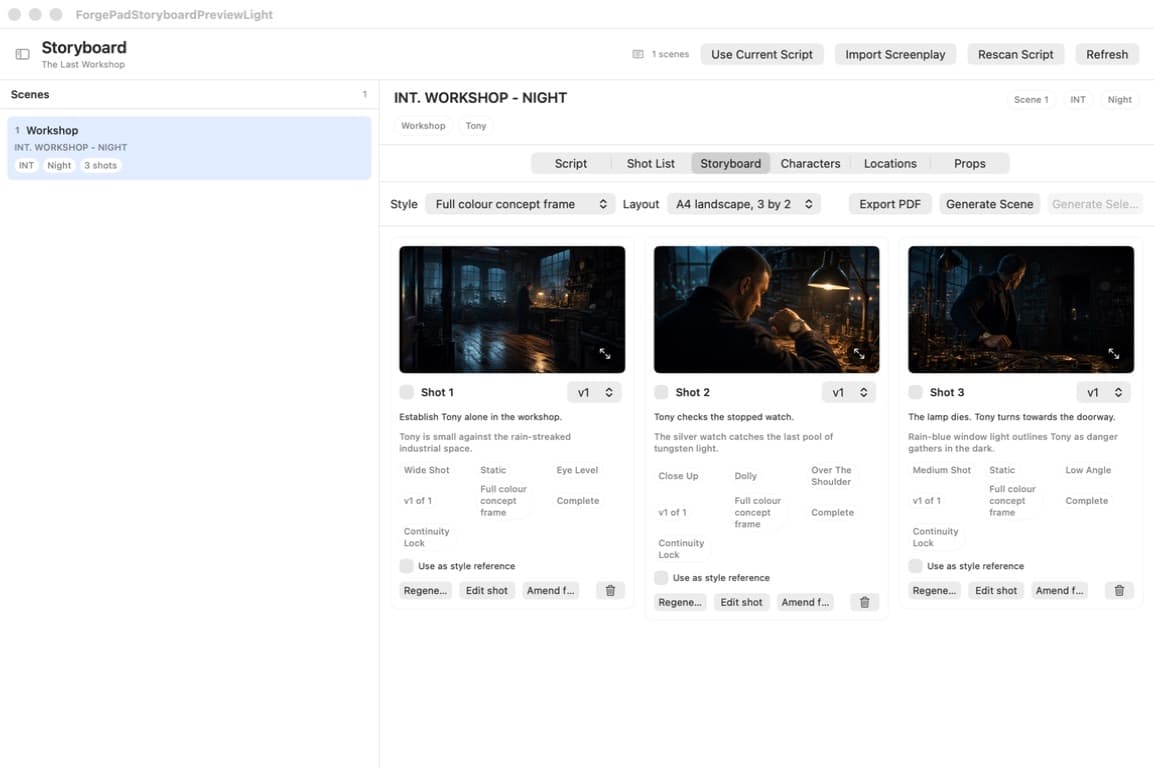
Open a scene, review the properly formatted screenplay and turn selected passages into individual shots.
Set the shot size, camera angle, movement, location and visual description before generating each frame.
Add character, location and prop references to help people, places and important objects remain consistent between shots.
Open generated frames in a larger preview, use earlier images as references and export the finished storyboard as a PDF.
ScriptForge helps writers understand a draft after it exists. ForgePad moves that idea into the writing room. Screenwriting software is brilliant at formatting pages, but the lonely part of rewriting is deciding what is actually wrong with the scene in front of you.
ForgePad is being built for that moment: when you need to keep writing, hear the scene, spot the weak line, understand the pressure problem, and move into the next pass without leaving the draft behind.
It is also built to be easy to move into. Writers should be able to import scripts from established tools like Final Draft, Fade In, Celtx, and other formats, then carry on developing the same work inside ForgePad.
Turn screenplay scenes into planned shots, guide the camera, maintain visual references, and export the finished storyboard as a PDF.
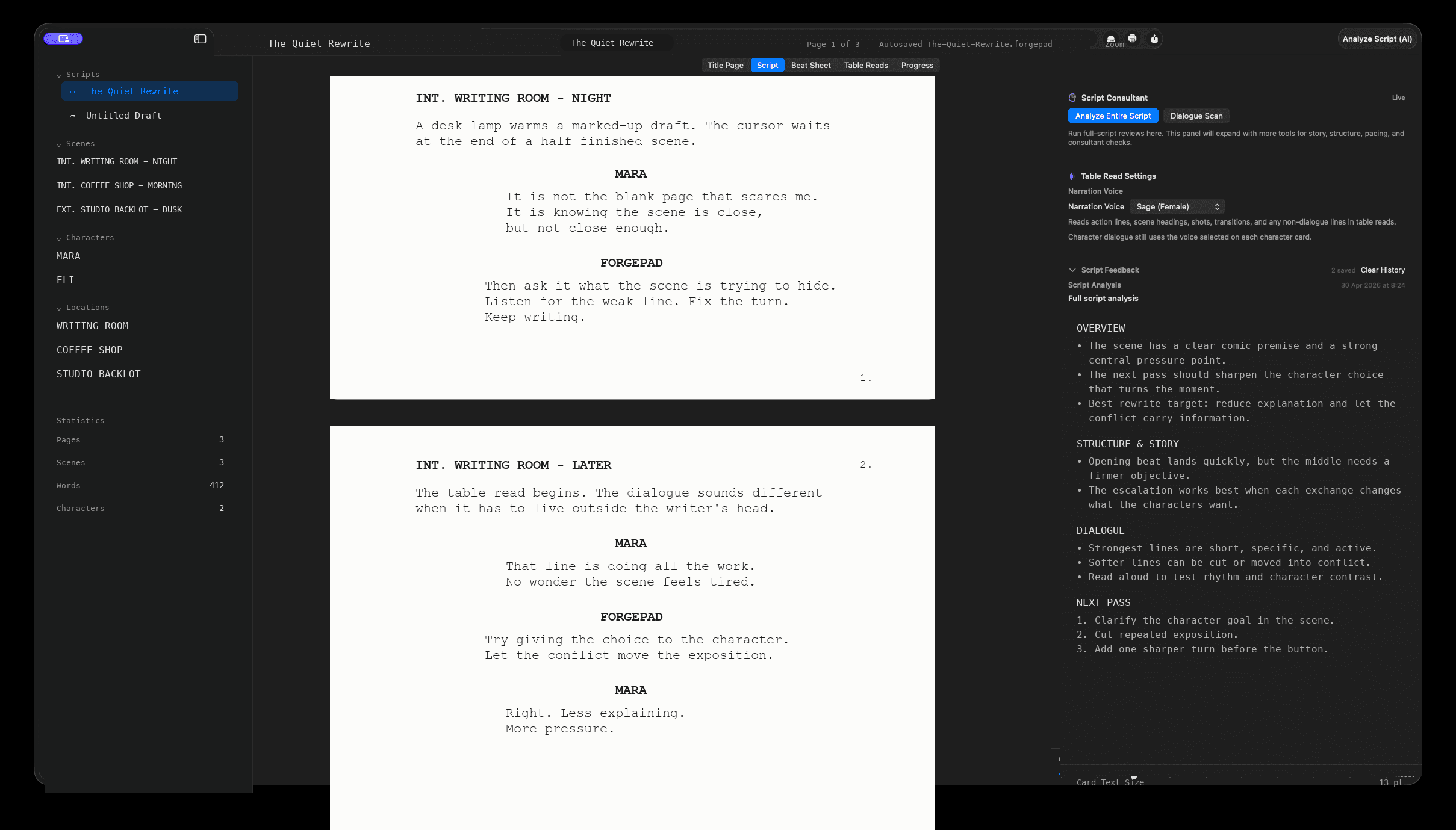
Write scenes, shape pages, move through a draft, and keep the work inside a dedicated macOS writing space.
Bring work across from tools such as Final Draft, Fade In, Celtx, and other screenwriting formats so starting in ForgePad does not mean starting again.
ForgePad is being built to feel like a script consultant is sitting next to you, ready to flag issues while the scene is still alive.
Identify weak dialogue, soft scene turns, unclear objectives, and moments where the rewrite needs sharper pressure.
Generate readbacks for scenes or full scripts so you can hear rhythm, pacing, voice, and character contrast.
Work on the same script with trusted collaborators, trade rewrites in real time, and make remote writing feel like writing in the same room.
From draft to next pass
The aim is not to bury the writer in reports. It is to keep the useful part of development close enough to affect the next sentence, the next beat, and the next version of the scene.
Write the scene in a focused screenplay environment.
Ask ForgePad where the scene is weak, flat, unclear, or losing pressure.
Listen back through a generated table read and hear what is not landing.
Move into the next pass with practical notes instead of vague anxiety.
The most important thing in writing is consistency. ForgePad will include achievements, goal tracking, and a global leaderboard to make showing up feel visible and rewarding.

Milestones reward showing up, finishing scenes, revisiting rewrites, and keeping projects alive.
Progress is built around sustained writing habits, not empty word-count chasing.
Writers can compete around consistency and goals, adding a little pressure and fun to the work.
It is not about rewarding meaningless typing. It is about giving writers a small push in the right direction: write with intent, revise with purpose, and build a rhythm that can survive the messy middle of a draft.
ForgePad is live on the App Store. Download the macOS screenwriting app and bring the editor, analysis, table reads, and rewrite workflow into your writing room today.
Get ForgePad
Download the official ForgePad screenwriting app from Apple and keep the latest version updated through the App Store.
ForgePad support and user guideScreenwriting software questions
ForgePad is designed to sit between a dedicated screenplay editor and a practical script development assistant: the place where writers format pages, test scenes, hear dialogue, and decide what the next pass needs.
ForgePad is screenwriting software for Mac. It combines a screenplay editor, script formatting, instant notes, table reads, story analysis, progress tracking, and collaboration tools in one writing workspace.
ForgePad is both. It is built as screenplay writing software first, with ScriptForge-style analysis, consultant feedback, dialogue checks, scene reports, and rewrite support built into the drafting workflow.
ForgePad is being built to import scripts from established screenwriting formats and tools such as Final Draft, Fade In, Celtx, PDF, Fountain, plain text, RTF, Word, and HTML.
ForgePad is for screenwriters, filmmakers, TV writers, playwrights adapting work for screen, and writing teams who want a focused script editor with feedback, table reads, and rewrite tools close to the page.