
Product Release
ForgePad launches Storyboard Beta for visual screenplay planning
Published 21 August 2026 by ScriptForge Editorial
ForgePad has launched Storyboard Beta, a new visual workspace that lets screenwriters turn scripted scenes into detailed shot plans without leaving their screenplay.
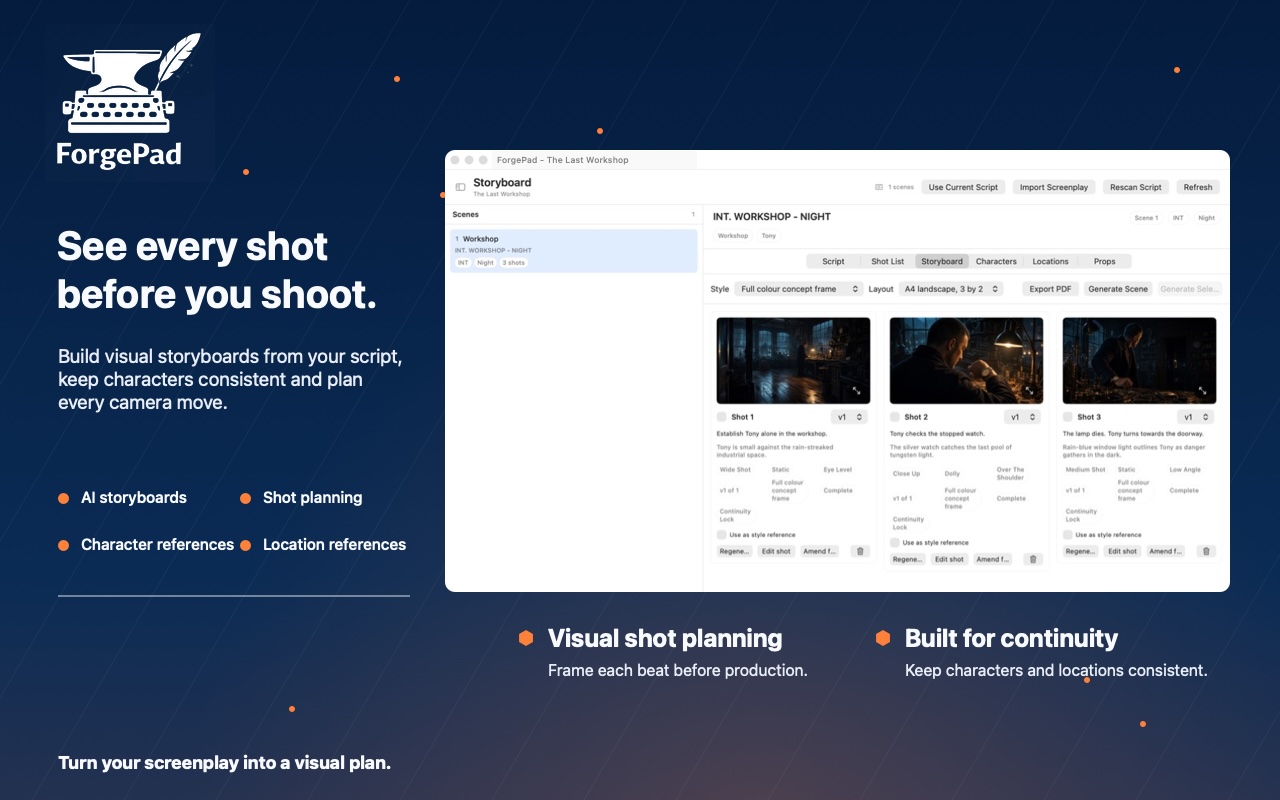
Available now in ForgePad 1.0.4 for macOS, the feature connects each storyboard directly to its corresponding scene. Writers can review the formatted screenplay, select a passage and create a new shot from the contextual menu.
Each shot can be developed using practical filmmaking controls, including shot size, camera angle, movement, location and visual description. These choices are also included when generating images, helping each frame reflect the intended direction more accurately.
From screenplay to storyboard
Storyboard Beta is designed to make visual planning feel like a natural extension of writing.
Instead of rebuilding scenes in a separate application, writers can move between the script and storyboard while keeping every shot connected to its original scene. Shots can be added, reordered and deleted directly within the storyboard workspace.
Generated frames can also be opened in a larger preview, making it easier to inspect composition, continuity and visual detail.
For writers preparing a pitch, collaborating with a director or planning an independent production, this creates a clearer route from the written page to a usable visual plan.
Consistent characters and locations
The new workspace includes dedicated sections for characters, locations and props.
Character images already attached to ForgePad character cards are brought into the storyboard automatically. Writers can then add further reference images when a character needs multiple visual angles, costumes or expressions.
Locations detected from the screenplay are connected to their corresponding scenes and shots. Users can upload visual references for each location, helping the image generator maintain a more consistent environment throughout the storyboard.
The same approach applies to important props. Together, these references give ForgePad more information about the people, places and objects that should remain recognisable between frames.
Multiple reference images can be imported at once, with support for common formats including JPEG, PNG and HEIC.
AI assisted and controlled by the writer
Storyboard Beta can generate visual frames using the information contained in each shot. The screenplay context, characters, location, props and selected camera direction all contribute to the generation request.
The writer remains responsible for the creative decisions. AI generation is used to visualise those decisions and support the planning process.
Continuity tools can use earlier storyboard frames as references for later shots, helping characters, locations and the overall visual style remain consistent across a sequence.
Generation uses ForgePad’s existing image credit system. Credits are only retained for completed generations, with failed requests automatically refunded.
Completed storyboards can also be exported as PDFs for production planning, collaboration or inclusion in a pitch package.
Available now in ForgePad 1.0.4
Storyboard Beta is available now as part of ForgePad 1.0.4 on the Mac App Store.
As a beta feature, the storyboard workspace will continue to develop in response to feedback from writers and filmmakers using it on real projects.
With Storyboard Beta, ForgePad expands beyond screenplay writing and development into visual preproduction, giving writers one connected place to write the scene, plan the coverage and see every shot before they shoot.